Adding Insteon Support to Visual Basic 6
Thanks to SmartHome and the SmartHome Device Manager (or SDM), this is really easy. Start a new Visual Basic project. Then click Project->References to bring up the list of ActiveX controls installed on your system.
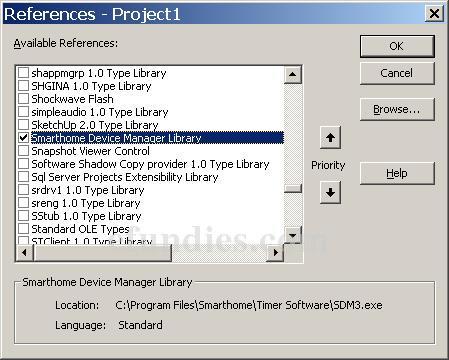
Notice that the image above refences C:\Program Files\Smarthome\Timer Software\SDM3.exe
If you have not installed the timer software, but you have installed SDM from some other source, you may have to refence SDM2Server Library which lives in C:\Program Files\Common Files\Smarthome\DeviceManager.
Now that you have the SmartHome Device Manager referenced, you need to create an object to talk to. It is best to Dim WithEvents so that you can respond to Insteon events. Put this code in your Visual Basic Form:
Option Explicit
Dim WithEvents sm As SDM3
Private Sub Form_Load()
' create a new instance of the SDM
Set sm = New SDM3Server.SDM3
End Sub
' this sub will be called when the
' PLC receives an Insteon Event
Private Sub sm_OnText(ByVal Text As String)
Debug.Print Text
End Sub
You are now ready to start responding to Insteon events. Check out the next topic, Turn Your Insteon Devices On and Off.
|